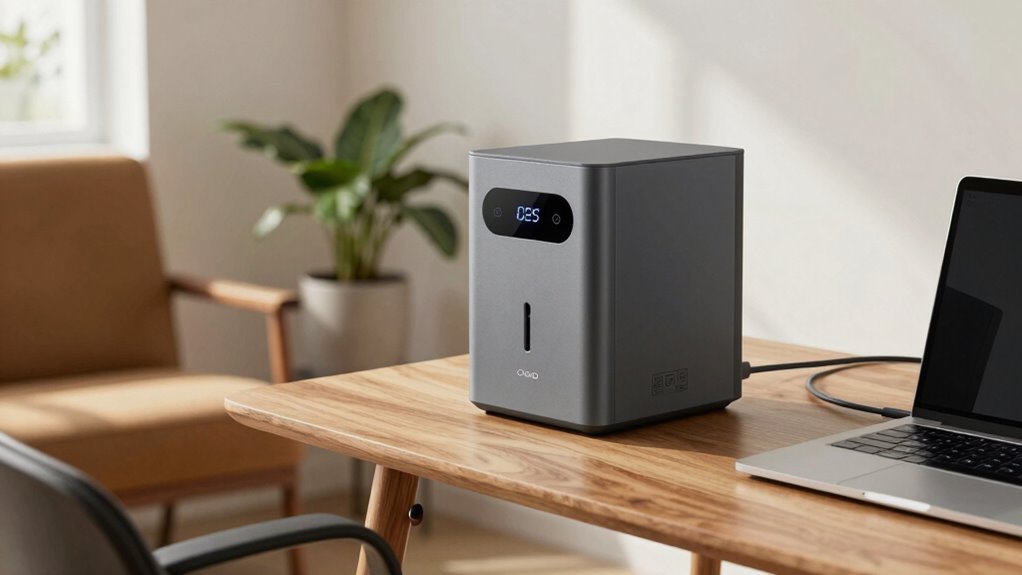
When it comes to powering a home office during outages or off-grid work, portable power stations provide a flexible and reliable solution. The EF ECOFLOW Delta 3 Classic stands out as the best overall with its high capacity and versatile outlets. For those seeking affordability, the Portable Power Station 300W offers solid performance without breaking the bank, while the Anker SOLIX S2000 excels in capacity for longer backup times. The biggest tradeoffs involve balancing capacity, portability, and cost—more power usually means more size and expense. Continue reading for a detailed breakdown of these options to find the best fit for your home office needs.

Get backup power and energy gear delivered free with Prime
- Fast, free delivery on millions of items
- Prime Video, Amazon Music and more included
- Member-only deals all year
Complete the kit


Key Takeaways
- Higher capacity units like the Anker SOLIX S2000 provide longer backup times but are bulkier and more expensive.
- Lighter, more affordable options like the 300W Solar Generator are suitable for basic device charging but may lack power for larger equipment.
- Inverter type and pure sine wave output are essential for sensitive electronics like computers and monitors.
- Battery chemistry impacts longevity and safety; LiFePO4 batteries tend to last longer and are safer for frequent use.
- Including solar compatibility offers flexibility but often adds to the initial cost and complexity of setup.
| EnginStar Solar Generator 300W Portable Power Station 296Wh Lithium Battery Backup with Dual 110V Pure Sine Wave Outlets for Camping and RV |  | Best for Outdoor Use and Compact Portability | Wattage: 296 watt-hours | Fuel Type: Electric | Power Source: Battery-Powered/ Solar Powered | VIEW ON AMAZON | See Our Full Breakdown |
| BLUETTI Elite 30 V2 Portable Power Station 288Wh 600W LFP Solar Generator |  | Best for Emergency and Outdoor Power with High Output | Capacity: 288Wh | Weight: 9.4 lbs | Continuous Power: 600W | VIEW ON AMAZON | See Our Full Breakdown |
| Portable Power Station 300W, 110V Solar Generator 280Wh (Without Solar Panel) | 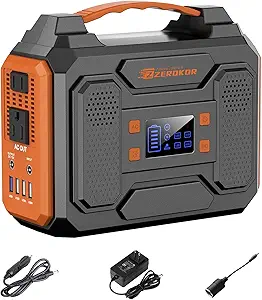 | Best Lightweight Option for Short-Term Power Needs | Wattage: 300 watts | Voltage: 110V | Battery Capacity: 280Wh | VIEW ON AMAZON | See Our Full Breakdown |
| EF ECOFLOW Portable Power Station Delta 3 Classic, 1024Wh, 1800W AC |  | Best for High Capacity and Versatile Home Use | Capacity: 1024Wh | Output Power: 1800W | Surge Power: 3600W | VIEW ON AMAZON | See Our Full Breakdown |
| Anker SOLIX S2000 Portable Power Station, 2010Wh, 3000W Peak, Home Backup |  | Best for Large-Scale Home Backup and Emergency Power | Wattage: 2010Wh | Peak Power: 3000W | Running Wattage: 1500W | VIEW ON AMAZON | See Our Full Breakdown |
| 1000W Portable Power Station 1024Wh LiFePO4 for Outdoor & Home |  | Best for Off-Grid Power Reliability in a Compact Form | Wattage: 1000 watts | Battery Capacity: 1024Wh | Power Source: Electric, Solar Powered | VIEW ON AMAZON | See Our Full Breakdown |
| portable power stations for home office | Wattage | Voltage | Item Weight | Weight |
|---|---|---|---|---|
| EnginStar Solar Generator 300W | 296 watt-hours | 110 volts | 6.5 pounds | — |
| BLUETTI Elite 30 V2 Portable P | — | — | — | 9.4 lbs |
| Portable Power Station 300W | 300 watts | 110V | — | 5 lbs |
| EF ECOFLOW Portable Power Stat | — | — | — | 26.7 pounds |
| Anker SOLIX S2000 Portable Pow | 2010Wh | — | 35.7 pounds | — |
| 1000W Portable Power Station 1 | 1000 watts | 110 volts | 27.73 lbs | — |
More Details on Our Top Picks
EnginStar Solar Generator 300W Portable Power Station 296Wh Lithium Battery Backup with Dual 110V Pure Sine Wave Outlets for Camping and RV
This compact power station excels in portability, making it ideal for outdoor activities like camping or RV trips where space and weight matter. Compared with the Portable Power Station 300W, 110V Solar Generator, it offers similar wattage but with a smaller footprint, though it sacrifices some capacity and device power. Its multiple recharge options, including solar, AC, and car, provide flexibility, but solar panels are sold separately, adding to the overall cost. The built-in safety protections and dual outlets ensure reliable, safe operation for small devices. However, its limited 296Wh capacity restricts it to devices under 300Wh, making it less suitable for home office setups that need longer runtimes or higher power. Overall, this pick makes sense for users prioritizing lightweight, outdoor-ready power solutions with moderate device needs.
Pros:- Compact and lightweight for easy portability
- Multiple charging options including solar, AC, and car
- Built-in safety protections for reliable operation
Cons:- Limited to devices under 300Wh, restricting larger equipment
- Solar panel sold separately, increasing overall cost
Best for: Outdoor enthusiasts or RV users needing a lightweight, portable backup for small devices
Not ideal for: Home office users with multiple or high-wattage devices requiring continuous, long-term power
- Wattage:296 watt-hours
- Fuel Type:Electric
- Power Source:Battery-Powered/ Solar Powered
- Voltage:110 volts
- Output Wattage:300 watts
- Item Weight:6.5 pounds
- Item Dimensions:9″L x 5.5″W x 7.5″H
Our verdict“Best suited for outdoor users who need a lightweight, reliable power source for small devices and occasional use.”
BLUETTI Elite 30 V2 Portable Power Station 288Wh 600W LFP Solar Generator
The BLUETTI Elite 30 V2 stands out for its high power output and lightweight design, making it well-suited for emergencies and outdoor adventures. It provides 288Wh capacity with a robust 600W continuous output and 1500W surge, outperforming smaller models like the Portable Power Station 300W, 110V Solar Generator in power. Its fast charging in under 45 minutes adds convenience, especially during quick recharges. While its capacity is still limited for extended use, the multiple charging modes and UPS functionality make it a versatile choice for critical device backup. The unspecified battery cell type might raise questions about longevity, but overall, this model balances power and portability well for users who need reliable emergency power or occasional outdoor use.
Pros:- Lightweight at 9.4 lbs with high portability
- High continuous power output of 600W
- Fast charging from 0-80% in 45 mins
Cons:- Limited capacity for extended use of multiple devices
- Complex charging options may confuse some users
Best for: Outdoor adventurers or emergency prepper who need portable power with higher wattage and fast charging
Not ideal for: Users needing long-term power for high-wattage or multiple devices over many hours
- Capacity:288Wh
- Weight:9.4 lbs
- Continuous Power:600W
- Surge Power:1500W
- Charging Modes:8 modes
- Fast Wall Charge:380W (0-80% in 45 mins)
- Output Outlets:9
Our verdict“Ideal for users requiring a lightweight, high-power portable station for short-term emergencies or outdoor activities.”
Portable Power Station 300W, 110V Solar Generator 280Wh (Without Solar Panel)
This 280Wh model offers a lightweight and straightforward solution for outdoor power needs or emergency use. It features multiple ports—AC, DC, USB—making it flexible for small devices, similar to the EnginStar Solar Generator 300W, but slightly lighter at 5 lbs. Its 300W output limits it to devices under that wattage, and without a solar panel included, you’ll need to buy one separately if off-grid recharging is desired. It’s a solid choice for quick, short-term power, but not meant for continuous heavy loads or long-term backup. Its built-in protection features and LED flashlight add convenience, but its limited capacity makes it less suited for prolonged home office use or powering high-wattage equipment.
Pros:- Multiple charging options including AC, DC, and USB
- Lightweight and portable with handle
- Built-in protection features and LED flashlight
Cons:- Cannot power devices over 300W, limiting some appliances
- Solar panel sold separately, increasing costs
Best for: Hikers, campers, or emergency users needing a portable, lightweight power bank for small devices
Not ideal for: Home office users or those needing to run larger equipment for extended periods
- Wattage:300 watts
- Voltage:110V
- Battery Capacity:280Wh
- Weight:5 lbs
- Number of Outlets:7
- Runtime:9 hours
Our verdict“Great for short-term, lightweight power needs in outdoor or emergency scenarios, but not for long-term or high-wattage use.”
EF ECOFLOW Portable Power Station Delta 3 Classic, 1024Wh, 1800W AC
The EcoFlow Delta 3 Classic offers a substantial 1024Wh capacity and 1800W continuous output, making it a standout for powering multiple devices or sensitive electronics during outages. Compared with smaller units like the BLUETTI Elite 30 V2, it provides nearly four times the capacity, suitable for longer home office work sessions or small appliance use. Its fast charging, solar compatibility, and smart app control add to its appeal for home and outdoor applications. The weight of 26.7 pounds is a tradeoff for the high capacity, potentially less portable for frequent outdoor use. This model is best for those who need reliable, high-capacity backup power but are willing to handle the extra weight and cost.
Pros:- High-capacity 1024Wh battery suitable for extensive use
- Fast charging from 0-80% in 45 minutes
- Supports solar recharging and smart app control
Cons:- Heavy at 26.7 pounds, less portable
- Not compatible with Delta 2 or Delta 3 Series Smart Batteries
Best for: Home users needing a reliable, high-capacity backup for multiple devices or sensitive electronics
Not ideal for: Users seeking a lightweight or ultra-portable solution for outdoor activities or infrequent use
- Capacity:1024Wh
- Output Power:1800W
- Surge Power:3600W
- Charging Time:0-80% in 45 mins
- Battery Type:LiFePO4
- Weight:26.7 pounds
Our verdict“Best for home or backup scenarios where capacity and versatility outweigh portability concerns.”
Anker SOLIX S2000 Portable Power Station, 2010Wh, 3000W Peak, Home Backup
The Anker SOLIX S2000 stands out with its impressive 2010Wh capacity and 3000W peak power, making it a prime choice for home backup during outages. It surpasses most other options like the EF ECOFLOW Delta 3 Classic in capacity, supporting extended operation of home office equipment, refrigerators, and other high-demand appliances. Its multiple outlets and solar recharging capability make it versatile for emergency preparedness. However, at 35.7 pounds, it’s quite heavy, which can limit portability. Its price is also likely higher, reflecting its large capacity. This model is best suited for users seeking long-term, high-wattage backup power and willing to handle the weight and cost involved.
Pros:- Exceptional 2010Wh capacity for extended runtime
- Supports solar input for off-grid recharging
- Multiple outlets suitable for various devices
Cons:- Heavy at 35.7 pounds, less portable
- Higher price point for large capacity
Best for: Homeowners or small businesses needing reliable, high-capacity backup power during outages
Not ideal for: Those requiring a lightweight, portable device for outdoor activities or infrequent use
- Wattage:2010Wh
- Peak Power:3000W
- Running Wattage:1500W
- Runtime:35 hours
- Item Weight:35.7 pounds
- Additional Features:Solar support, multiple outlets
Our verdict“Ideal for serious backup power needs where capacity and long runtime are priorities over portability.”
1000W Portable Power Station 1024Wh LiFePO4 for Outdoor & Home
This power station stands out for its large 1024Wh LiFePO4 battery, offering long-term reliability for home office setups during outages or off-grid work. Unlike the EF ECOFLOW Delta 3 Classic, which provides similar capacity but with a higher wattage output, this model emphasizes safety and longevity thanks to its LiFePO4 chemistry. However, it’s limited to a 2-minute runtime at full load, which might be insufficient for sustained high-power tasks. Its support for multiple fast-charging ports—including USB-C and AC outlets—makes it versatile for various devices, but its weight of nearly 28 pounds can be a drawback for frequent relocation. Solar compatibility makes it suitable for emergency preparedness, although dependence on sunlight limits its consistency for daily use. Overall, this pick makes the most sense for users needing a reliable, portable backup with a focus on safety and longevity rather than prolonged high-power operation.
Pros:- High-capacity 1024Wh LiFePO4 battery with long cycle life
- Supports multiple fast-charging ports including AC, USB-C, and USB-A
- Solar compatible for off-grid use
- Lightweight and portable with a durable handle
Cons:- Limited runtime of 2 minutes at full load
- Relatively heavy at 27.73 lbs for frequent portability
- Dependent on sunlight for optimal solar charging, which may not be reliable in all conditions
Best for: Home office users who need a dependable backup during outages and enjoy outdoor work or emergency preparedness.
Not ideal for: Heavy users requiring continuous high wattage for extended periods, as it cannot sustain full load for more than a couple of minutes.
- Wattage:1000 watts
- Battery Capacity:1024Wh
- Power Source:Electric, Solar Powered
- Voltage:110 volts
- Output Wattage:1000 watts
- Runtime:2 minutes at full load
- Item Weight:27.73 lbs
- Item Dimensions:18″L x 12″W x 16″H
- Additional Features:Multi-port fast charging, solar compatibility, 6-layer safety protection
Our verdict“This power station is ideal for users who prioritize safety, long-term reliability, and portability for intermittent home office use and outdoor activities.”

How We Picked
I based the selections on a combination of performance, build quality, usability, and value. Key factors included battery capacity, inverter wattage, port variety, and portability. I also evaluated the longevity of the battery chemistry, especially for home office use where reliability over time matters. Each product was ranked according to how well it balances these features with price, ensuring options for different budgets and needs. This approach helps identify not just the most powerful units, but those that offer real-world convenience and durability for home office setups.Factors to Consider When Choosing Portable Power Stations For Home Office
Choosing the right portable power station for your home office involves more than just capacity. You need to consider how much power your devices draw, how portable the unit is, and how it fits into your budget. Understanding these factors helps avoid common pitfalls like overspending on unnecessary capacity or buying a device that’s too bulky for your workspace. The following sections cover key considerations to help you make an informed decision.Capacity and Runtime
Assess your typical power needs by listing all essential devices, then choose a unit with enough watt-hours (Wh) to keep them running during outages. Larger capacities like 1000Wh provide longer backup times but come with increased size and weight. For a home office, balancing capacity with portability is key, especially if you need to move the station frequently or store it easily. Overestimating capacity can mean unnecessary expense and bulk, so match your power needs carefully.
Inverter Power and Outlet Types
The inverter converts stored DC power into AC for your devices. For home office equipment such as computers, monitors, and printers, a pure sine wave inverter is critical, as it ensures clean, stable power. A wattage rating of at least 600W is recommended for most setups, but larger devices like laser printers or multiple monitors require more. Check that the station has enough AC outlets and the right plug types to support your gear without needing adapters.
Port Selection and Expandability
Look for a variety of ports—USB-C, USB-A, AC outlets, and DC inputs—to cover all your devices. Some units also support solar input, offering a way to recharge sustainably and independently. Consider future needs; a station with expandable ports or additional battery modules can adapt as your setup grows. Avoid overly limited port selections that may force you into additional purchases or compromises.
Battery Chemistry and Longevity
The quality of the battery impacts both durability and safety. Lithium Iron Phosphate (LiFePO4) batteries tend to last longer—often over 2000 charge cycles—and are more stable, making them ideal for frequent use. Standard lithium-ion batteries, while cheaper upfront, may degrade faster and require replacement sooner. For a home office where dependability matters, investing in a LiFePO4-based unit can pay off over time.
Size, Weight, and Portability
Portability is a key factor if your setup involves moving the station between locations or storing it when not in use. Larger capacities typically mean heavier units, which could be cumbersome for daily handling. Conversely, ultra-lightweight models might lack the power needed for longer outages. Find a balance that fits your space constraints and mobility preferences, especially if you plan to use the station in different rooms or for off-grid work.
Price and Value
Prices vary widely based on capacity, features, and brand reputation. A higher upfront investment often means longer-lasting batteries, better build quality, and more features like solar compatibility. Consider your budget carefully and prioritize features that align with your most common use cases. Sometimes, spending a bit more initially can save money and hassle in the long run by avoiding frequent replacements or upgrades.
Frequently Asked Questions
Can I run my desktop computer and monitor simultaneously on a portable power station?
Yes, as long as the combined wattage of your devices does not exceed the inverter’s rated output. For most desktop setups, a station with at least 600W to 1000W inverter capacity is recommended. Pure sine wave inverters are preferred to ensure stable power, which is essential for sensitive electronics. Always check the wattage of your devices and the station’s specifications before connecting them to avoid overloads.
How long will a portable power station last during a typical workday?
The runtime depends on your total power consumption. For example, a 1000Wh station powering a 100W computer and monitor could run roughly 8-10 hours. Smaller units may last only a few hours, which might be enough for short outages but not all-day backups. To extend runtime, consider units with higher capacity or additional batteries, especially if you experience frequent power interruptions.
Are solar panels necessary for using a portable power station for my home office?
Solar panels are not necessary but can add flexibility by enabling off-grid recharging. If your power needs are not urgent or you’re interested in sustainable energy, solar compatibility is advantageous. Keep in mind that solar panels require space, time to recharge, and additional investment. For daily backup in a typical home office, grid recharging via wall outlet is usually sufficient, but solar can be a helpful backup option.
What safety features should I look for in a portable power station?
Look for features like overcharge protection, short circuit protection, thermal management, and overload shutoff. These safeguards help prevent damage to your devices and extend the lifespan of the station. A unit with built-in safety certifications (such as UL or CE) provides extra peace of mind. Ensuring the station has these features is especially important if it’s used frequently or stored in accessible areas.
How do I choose between a LiFePO4 battery and a standard lithium-ion battery?
LiFePO4 batteries generally offer longer cycle life, better thermal stability, and safer operation, making them ideal for regular or long-term use. Standard lithium-ion batteries tend to be cheaper upfront but may degrade faster, requiring earlier replacement. If you plan to rely heavily on your portable power station for your home office, investing in a LiFePO4 model can provide better durability and peace of mind, despite the higher initial cost.
Conclusion
If you need a reliable, high-capacity backup for your home office and are willing to invest in longevity and features, the EF ECOFLOW Delta 3 Classic makes the most sense as the best overall choice. For budget-conscious users or those with minimal power needs, the Portable Power Station 300W offers decent performance without overspending. Tech enthusiasts or professionals with demanding setups should consider the Anker SOLIX S2000 for its impressive capacity and durability. For beginners or occasional users, lighter, simpler models provide a straightforward, cost-effective solution. Tailor your choice to your specific power requirements, mobility preferences, and budget to find the best fit.
As an affiliate, we earn on qualifying purchases.Halloween Picks
halloween