
This guide shows how to choose, set up, and use a portable solar power bank to charge smartphones, tablets, or small devices while outdoors or off-grid. It’s designed for beginners seeking reliable, eco-friendly power sources for travel, camping, or emergency use. Following these steps will ensure effective use and maximum battery life of your solar power bank.

Get backup power and energy gear delivered free with Prime
- Fast, free delivery on millions of items
- Prime Video, Amazon Music and more included
- Member-only deals all year
Difficulty: Beginner | Time: 15-30 minutes
What You’ll Need
Tools & Materials:
- Portable solar power bank
- USB charging cable(s) for your device
- Device to charge (smartphone, tablet, etc.)
Knowledge:
- Basic understanding of charging devices via USB
- Ability to operate a power bank and read device indicators
Charge the power bank fully before first use if possible. Check compatibility of your devices with the power bank’s output specifications. Ensure the solar panel is clean and unobstructed for optimal sunlight exposure.
Before You Start
Position the solar panel in direct sunlight for maximum efficiency. Avoid shadowed areas or cloudy conditions during initial charging. Confirm your devices are compatible with the power bank’s output (usually 5V USB).
Step-by-Step Instructions
Step 1: Select the right portable solar power bank
Choose a solar power bank with sufficient capacity (measured in mAh or Wh) for your needs and compatible outputs (USB-A, USB-C). Read product specifications to verify it can charge your devices.
Tip: Opt for a model with a higher capacity if you plan to charge multiple devices or over several days.
Check: You have selected a power bank with adequate capacity and appropriate output ports for your devices.
Step 2: Charge the power bank fully before initial use
Connect the power bank to a power source using the provided cable or charger. Allow it to charge until indicator lights show full capacity, or the display confirms full charge.
Tip: If the power bank has both solar and input charging options, use the input port for a faster initial charge.
Check: The power bank indicates full charge via its LED lights or display panel.
Step 3: Position the solar panel in direct sunlight
Place the solar panel outdoors in an unobstructed, direct sunlight area. Angle it appropriately to maximize sunlight exposure, typically facing the sun directly.
Tip: Adjust the angle periodically during the day for better sunlight intake.
Check: The solar panel is receiving direct sunlight, indicated by its brightness or a visible reflection; device is generating power.
Step 4: Connect your device to the power bank
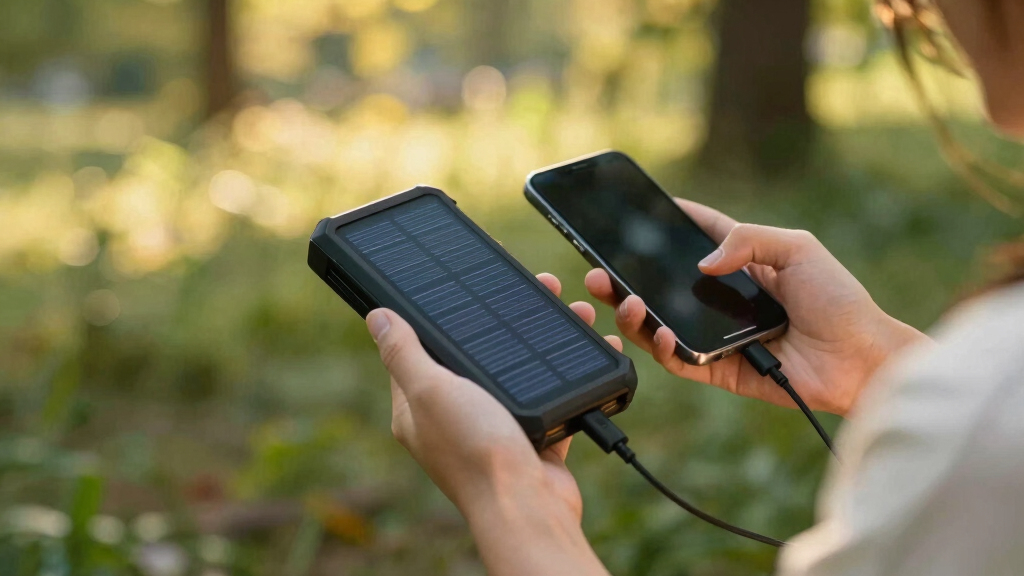
Use a compatible USB cable to connect your device to the power bank’s output port. Ensure the connection is secure.
Tip: Use the cable that came with your device or a certified replacement for safety and efficiency.
Check: Your device’s charging indicator activates, showing that power is flowing from the power bank.
Step 5: Monitor charging progress
Check your device periodically to ensure it continues charging. Observe the power bank’s indicator lights or display for status updates.
Tip: Avoid disconnecting devices prematurely; wait until charging completes or reaches your desired charge level.
Check: Your device is successfully charging, with battery percentage increasing or charging icon visible.
Common Mistakes to Avoid
- Not positioning the solar panel in direct sunlight — Place the panel outdoors in open, sunny areas and avoid shadows or cloudy conditions during charging.
- Using incompatible cables or ports — Use the cables provided or certified cables matching your device’s charging port and verify power bank output specifications.
- Discharging the power bank completely before recharging — Recharge the power bank periodically, especially after heavy use, to maintain optimal performance.
Troubleshooting
Problem: Device is not charging from the power bank
Solution: Ensure the cable is securely connected, the power bank is charged, and that the output port is functional. Try a different cable or port if available.
Problem: Power bank not charging in sunlight
Solution: Check for shadows or obstructions on the solar panel. Reposition the panel in direct sunlight and ensure it is angled correctly.
Problem: Power bank indicator lights do not turn on
Solution: Connect it to a power source via the input port to charge fully. Verify the power bank is turned on if it has a power button.
What Success Looks Like
The device charges fully or as desired, and the power bank’s indicator lights or display confirm it has stored energy. The device being charged shows an increasing battery level or charging icon.
Next Steps
Regularly recharge the power bank when not in use. Store it in a cool, dry place. Use it for charging devices as needed during outdoor activities. Replace or upgrade the power bank if capacity diminishes significantly over time.
Frequently Asked Questions
How long does a solar power bank take to fully charge in sunlight?
Charging time varies based on sunlight intensity, capacity of the power bank, and panel size. Typically, it takes 4-8 hours of direct sunlight to fully charge a standard 10,000 mAh power bank.
Can I charge multiple devices at once?
Yes, if your power bank has multiple USB ports, you can connect and charge several devices simultaneously, respecting the maximum total output capacity.
Is a solar power bank suitable for emergency backup?
Yes, it provides portable, renewable energy for charging essential devices during power outages or outdoor emergencies, but ensure it is fully charged beforehand.
Halloween Picks
halloween
As an affiliate, we earn on qualifying purchases.