TL;DR
Building your own AI workstation was cheaper for years, but today prebuilt systems often match or beat DIY on price due to market shortages. The choice now hinges on support, customization, and how much control you want over heat and noise management.
Imagine this: You need an AI workstation that’s powerful, quiet, and ready to go. Do you roll up your sleeves and build it yourself, or do you buy a prebuilt system that’s already optimized? The answer isn’t as straightforward as it used to be—especially in 2026, when market conditions have flipped the script.
This article cuts through the hype to show you the real tradeoffs: cost, speed, support, and customization. Whether you’re a hobbyist, a startup, or a research team, understanding these factors helps you choose the right machine—without regrets or surprises.
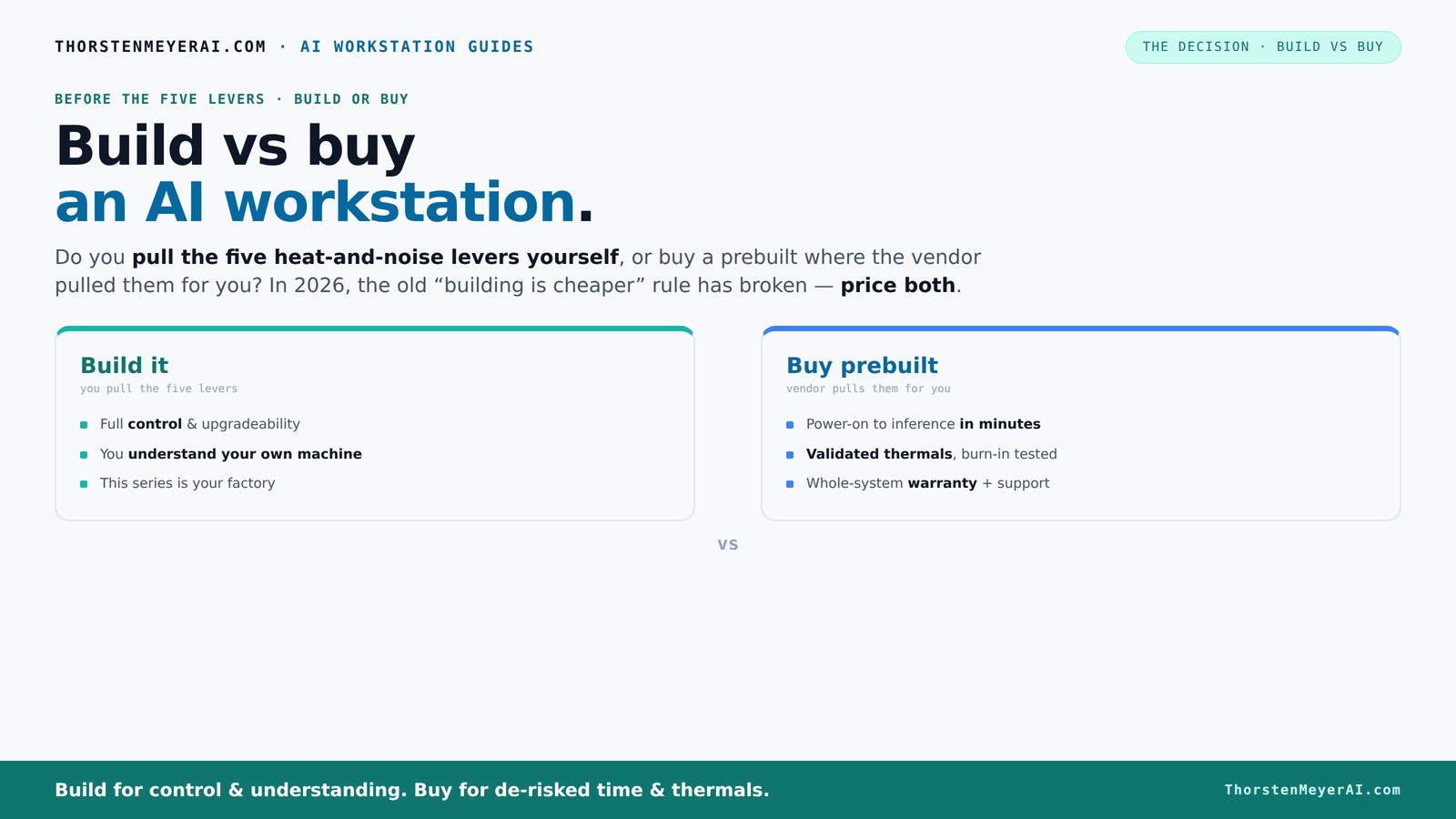
Build vs buy
an AI workstation.
The real question behind this whole series: do you pull the five heat-and-noise levers yourself, or buy a prebuilt where the vendor pulled them for you? And in 2026, the old “building is cheaper” rule has broken. Match your situation in Part 3.
Key Takeaways
- Market shortages in 2026 mean prebuilts often match or beat DIY on cost, shifting the usual build-vs-buy calculus.
- Support, warranty, and validated thermals make prebuilts a safer choice for mission-critical AI workloads.
- Building your own system offers unparalleled control over noise, cooling, and upgrades—if you have the time and expertise.
- Total cost of ownership depends heavily on workload frequency and long-term needs, not just initial price.
- Evaluate your workload, support needs, and upgrade plans before choosing—there’s no one-size-fits-all answer.

Porch Shield Waterproof Universal Generator Cover 32 x 24 x 24 inch - for Most Generators 5000-10000 Watt, Black
Compatible - More sizes for 5000w -10000w gas generator or inverter generator.
As an affiliate, we earn on qualifying purchases.
Why Building Your Own AI Workstation No Longer Guarantees a Lower Price
Building your own system used to be cheaper, but that’s no longer a given in 2026. Component shortages, especially for GPUs and high-speed RAM, have driven prices sky-high. A DIY build that once hovered around $1,000 now easily hits $1,250+.
Large vendors bought components in bulk before prices spiked, allowing them to offer systems comparable to or even cheaper than DIY options. For example, a custom BIZON system with a top-tier GPU now costs about the same as piecing one together yourself, but with the added benefit of validation and warranty.
So, if your main goal is to save money upfront, it’s time to double-check both options. Don’t assume DIY always wins—because right now, prebuilts often do.
Porch Shield Waterproof Universal Generator Cover 38 x 28 x 30 inch - for Most Generators 5500-15000 Watt, Black
Compatible - More sizes for 5500w -15000w gas generator or inverter generator.
As an affiliate, we earn on qualifying purchases.
Who Should Build and Who Should Buy?
The decision really comes down to your priorities: control versus convenience. If you love tinkering, enjoy selecting each part, and want the lowest possible cost, building your own makes sense.
On the other hand, if you prefer a machine that’s ready to run out of the box, with tested thermals and support, buying a prebuilt saves hours of setup and troubleshooting. For example, vendors like Lambda or Puget run extensive burn-in tests, fine-tune cooling, and provide warranties—reducing the risk of thermal throttling or hardware failure mid-job.
**Practical takeaway:** If you’re new to building or need your workstation quickly, lean toward buying. If you’re experienced and want maximum control, consider building. Use a decision matrix: list your priorities—cost, time, control, support—and score each option accordingly.

Generator Cover Portable Waterproof,Generator Rain Cover for Outside,Universal Generator Cover for Most Portable Generators 5000-10000 Watt(32"L x 24"W x 24"H)
【Dimensions】Generator Covers for outside 32x24x24 inch Fits Most Generators 5000-10000 Watt for Predator 6500/7250/8000/8750/9000/9500,Duromax 9000/ 10000W/10000EH/xp10000e/12000/XP13000EH,Westinghouse 6000/7500/9500,Honda EU7000is/EM5000is/5000/EX6500/EM6500,Craftsman...
As an affiliate, we earn on qualifying purchases.
Cost Comparison: Upfront and Long-Term
| Build | Buy |
|---|---|
| Lower initial component costs, but requires time and effort to assemble | Higher upfront price due to assembly, support, and profit margin |
| Potential for upgrades and customization | Limited upgrade options; often designed as sealed systems |
| Long-term savings depend on ongoing use and maintenance | Warranty and support reduce unexpected costs and downtime |
**Practical action:** Calculate total cost of ownership over your expected lifespan. Include potential upgrade costs, downtime risks, and support expenses. If you plan to upgrade frequently or need guaranteed uptime, prebuilts with support may offer better value.

Jackery Solar Generator 1000 v2 with 200W Solar Panel,1070Wh Portable Power Station LiFePO4 Battery,1500W AC/100W USB-C Output, 1Hr Fast Charge for Outdoor,Off-Grid Living,RV,Emergency
Powerful yet Compact: Boasting a 1,500W AC output and a 3,000W surge peak, the Solar Generator 1000 V2...
As an affiliate, we earn on qualifying purchases.
Performance and Upgradability—What Matters Most?
Performance isn’t just about raw specs—it’s about how well your system handles your workload. Vendors optimize prebuilts for AI tasks, including AI-specific hardware and software tuning. If you’re doing multi-GPU training, a prebuilt like Lambda offers validated cooling and power, reducing the risk of throttling.
Building your own gives you control over every component—choosing a quiet GPU, matching cooling to your noise preferences, or expanding RAM later. But it also demands technical know-how and time.
**Practical action:** Assess your workload. If you need consistent high performance, consider prebuilts with validated cooling. If you want customization or plan to upgrade over time, building might be better. Use benchmarking data and vendor reviews to inform your choice.
Support, Warranty, and Risk of Downtime
Prebuilt systems come with integrated support and warranties—often 3–5 years. If something fails, you call one vendor. They troubleshoot, replace parts, and get you back up fast. For example, Puget’s systems undergo 48 hours of stress testing before shipping, ensuring reliability from day one.
**Practical step:** Before purchasing, review support options. Ask vendors about response times, on-site service, and warranty coverage. For critical workloads, prioritize vendors with proven support track records. Consider purchasing extended warranty or support plans if available.
DIY builds mean juggling multiple warranties. If your GPU fails, you deal with the manufacturer; if your power supply dies, you call that vendor. Troubleshooting compatibility issues or BIOS bugs can add days or weeks to your project.
**Actionable tip:** Keep a detailed inventory of all warranties and support contacts. Regularly test your system’s stability to catch issues early, minimizing downtime during critical phases.
Performance Optimization in Prebuilts vs DIY
Prebuilts often ship with AI-focused tweaks: optimized BIOS settings, custom cooling, and software tuning that maximize GPU performance and thermal stability. This means less setup time and fewer surprises.
DIY allows you to fine-tune everything—undervolting, fan curves, airflow—using guides like this setup guide. But it demands time, patience, and experience.
**Practical takeaway:** For critical AI workloads, choose prebuilts with validated cooling and tuning. For experimentation and learning, DIY provides valuable hands-on experience. Use benchmarking tools and thermal monitoring software to verify performance gains and stability.
Ownership, Data Control, and Offline Security
Keeping your AI work in-house means total control—no data leaks, no dependency on cloud providers. This matters for sensitive projects or proprietary data. A local workstation makes offline work seamless and secure.
**Practical advice:** For highly sensitive projects, invest in physical security measures—locked server racks, secure rooms—and ensure your network is isolated. Regularly update your security protocols and backups to prevent data loss.
For example, an enterprise developing confidential models might prefer a sealed, air-gapped system with encrypted drives, rather than cloud solutions vulnerable to breaches.
Managing your own hardware does require discipline: schedule regular updates, backups, and hardware checks. Automate where possible to minimize human error and downtime.
Cloud vs Local: Which Fits Your AI Workload?
While this article focuses on build vs buy, it’s worth noting that cloud GPU rentals remain a competitor—especially for sporadic or short-term projects. But for sustained workloads, owning a workstation often wins on cost and control.
Research from this source shows that a local machine can save thousands over a year of continuous use, depending on cloud rates and utilization.
**Practical decision:** Evaluate your workload frequency. For occasional experiments, cloud may be more cost-effective. For daily training or large datasets, owning a dedicated workstation reduces long-term costs and provides more control over data security and hardware configurations.
Your Buyer Checklist for a Future-Proof AI Workstation
- Determine your workload: training, inference, development?
- Balance cost, support, and customization needs
- Check current component prices and availability
- Decide if you want to upgrade later—prebuilts are less flexible
- Consider support and warranty options—are they worth the premium?
**Practical step:** Use this checklist to evaluate potential systems. Assign scores based on your specific needs and budget. For example, if uptime is critical, prioritize vendors with rapid support response times and comprehensive warranties. If budget is tight, focus on flexible upgrade paths and component availability.
Frequently Asked Questions
Is it actually cheaper to build my own AI workstation in 2026?
Not always. Due to component shortages and bulk buying, prebuilts often cost as much or less than DIY, especially for high-end systems. Always price both options for your specific specs before deciding.How important is vendor support and warranty for AI workstations?
Very important. Prebuilts come with support that can troubleshoot hardware issues quickly, reducing downtime during critical projects. DIY setups mean juggling warranties individually, which can delay repairs.Can I upgrade a prebuilt system later?
It depends. Some prebuilts allow upgrades, but many are sealed systems designed for stability rather than future expansion. DIY builds are generally easier to upgrade, component by component.Are prebuilt AI systems with NPUs worth it?
Yes, increasingly so. Vendors are integrating AI-optimized hardware like NPUs, which accelerate specific workloads and reduce power consumption—offering real performance gains for AI tasks.When does cloud computing make more sense than owning a workstation?
If your workload is sporadic or short-term, cloud GPU rentals can be more cost-effective. For sustained, heavy workloads, owning your own machine often saves money and gives more control.Conclusion
In 2026, the old rule—DIY is always cheaper—no longer holds. Prebuilt AI workstations offer compelling value with support, reliability, and often, cost competitiveness.
Choose the path that matches your workload, patience, and need for control. The best machine is the one that gets you working without surprises—whether you build it or buy it.